
187 lines
7.0 KiB
Markdown
187 lines
7.0 KiB
Markdown
MPGNotification
|
|
===============
|
|
|
|
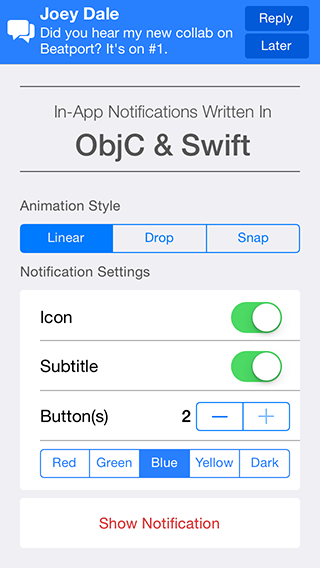
MPGNotifications is an iOS control that allows you to display in-app interactive notifications that are fully customisable to suit your needs.
|
|
|
|
Available via [Cocoapods](http://cocoapods.org/): `pod 'MPGNotification', '~> 1.2'`
|
|
|
|
|
|
|
|
## Overview
|
|
`MPGNotification` objects are `UIView` objects. They are displayed on top of "everything" using self-contained logic that grabs the level of the top-most window (as reported by `UIApplciation`).
|
|
|
|
You just initialize them, configure them, and show them. That's it!
|
|
|
|
## Initialization
|
|
Initializing an `MPGNotification` object is simple - just use init! Or new!
|
|
``` obj-c
|
|
MPGNotification *notification = [[MPGNotification alloc] init];
|
|
MPGNotification *anotherNotification = [MPGNotification new];
|
|
```
|
|
|
|
You may also use the following convenience method to initialize a Notification with many of the "basic" visualization properties already set:
|
|
|
|
``` obj-c
|
|
MPGNotification *easyNotification =
|
|
[MPGNotification notificationWithTitle:@"Greetings!"
|
|
subtitle:@"Did you know we have Notifications now?"
|
|
backgroundColor:[UIColor redColor]
|
|
iconImage:[UIImage imageNamed:@"radical"]];
|
|
```
|
|
|
|
## Showing the Notification!
|
|
After you have configured your Notification, it's easy to show it on screen! Because the `MPGNotification` discovers its own superview and location in the view hierarchy, you simply need to call `show`:
|
|
|
|
``` obj-c
|
|
[notification show];
|
|
```
|
|
|
|
However, simply showing the Notification can be limiting. What if you want to take action when someone taps the Notification?
|
|
|
|
## Buttons and Triggering Action
|
|
If a user taps the background of a Notification, or one of the buttons you have configured, you can take action in two ways. You may set the `buttonHandler` property, like so:
|
|
|
|
``` obj-c
|
|
notification.buttonHandler = ^(MPGNotification *notification, NSInteger buttonIndex) {
|
|
if (buttonIndex == notification.firstButton.tag) {
|
|
NSLog("User tapped the only button on-screen!");
|
|
}
|
|
};
|
|
|
|
[notification show];
|
|
```
|
|
|
|
..or you can simply show the Notification with the following convenience method:
|
|
|
|
``` obj-c
|
|
// easyNotification.buttonHandler == nil
|
|
[easyNotification showWithButtonHandler:^(MPGNotification *notification, NSInteger buttonIndex) {
|
|
if (buttonIndex == notification.backgroundView.tag) {
|
|
NSLog("User tapped the background of the Notification!");
|
|
}
|
|
}];
|
|
```
|
|
|
|
### Button Configuration
|
|
The following button configurations are available:
|
|
``` objc
|
|
typedef NS_ENUM(NSInteger, MPGNotificationButtonConfigration) {
|
|
MPGNotificationButtonConfigrationZeroButtons = 0,
|
|
MPGNotificationButtonConfigrationOneButton,
|
|
MPGNotificationButtonConfigrationTwoButton,
|
|
MPGNotificationButtonConfigrationCloseButton
|
|
};
|
|
```
|
|
The buttons used in the UI adapt to the configuration as follows:
|
|
``` objc
|
|
switch (self.buttonConfiguration) {
|
|
|
|
case MPGNotificationButtonConfigrationZeroButtons:
|
|
// self.firstButton, self.secondButton, and self.closeButton == nil
|
|
break;
|
|
|
|
case MPGNotificationButtonConfigrationOneButton:
|
|
// self.firstButton != nil
|
|
// self.secondButton and self.closeButton == nil
|
|
break;
|
|
|
|
case MPGNotificationButtonConfigrationTwoButton:
|
|
// self.firstButton and self.secondButton != nil
|
|
// self.closeButton == nil
|
|
break;
|
|
|
|
case MPGNotificationButtonConfigrationCloseButton:
|
|
// self.closeButton != nil
|
|
// self.firstButton and self.secondButton == nil
|
|
break;
|
|
|
|
}
|
|
// self.backgroudnView is unrelated to self.buttonConfiguration, and is always != nil, but does not always receive touches
|
|
```
|
|
|
|
## Properties
|
|
All properties must be set *BEFORE* `show` or `showWithButtonHandler:` is called. The following properties and 'setter methods' are available:
|
|
```objc
|
|
// Properties used for basic styling
|
|
@property (nonatomic, strong) NSString *title; // required
|
|
@property (nonatomic, strong) NSString *subtitle; // optional
|
|
@property (nonatomic, strong) UIImage *iconImage; // optional
|
|
@property (nonatomic, strong) UIColor *backgroundColor; // optional
|
|
|
|
// Allows actions and dismissal when the background of the Notification is tapped.
|
|
// Default: YES
|
|
@property (nonatomic) BOOL backgroundTapsEnabled;
|
|
|
|
// Allows 'swipe to dismiss' action on the Notification, similar to iOS Push Notifications.
|
|
// Default: YES
|
|
@property (nonatomic) BOOL swipeToDismissEnabled;
|
|
|
|
// Allows full-screen messages on iPad. Defaults to NO, similar to iOS Push Notifications.
|
|
@property (nonatomic) BOOL fullWidthMessages;
|
|
|
|
// To set the title color of the notification.
|
|
// Default: [UIColor whiteColor]
|
|
@property (nonatomic, strong) UIColor *titleColor;
|
|
|
|
// To set the subtitle color of the notification.
|
|
// Default: [UIColor whiteColor]
|
|
@property (nonatomic, strong) UIColor *subtitleColor;
|
|
|
|
// Set this to any positive value to automatically dismiss the Notification after the given duration.
|
|
// Default: 0.0
|
|
@property (nonatomic) NSTimeInterval duration;
|
|
|
|
// Used to specify the type of animation that the notification should use to show and dismiss.
|
|
// Default: MPGNotificationAnimationTypeLinear
|
|
@property (nonatomic) MPGNotificationAnimationType animationType;
|
|
|
|
// Sets the button handler block directly; is also be set indirectly by calling showWithButtonHandler:
|
|
// Default: nil
|
|
@property (nonatomic, strong) MPGNotificationButtonHandler buttonHandler;
|
|
|
|
// Sets a dismiss hanlder block that is called when the Notification is dismissed
|
|
// Default: nil
|
|
@property (nonatomic, copy) MPGNotificationDismissHandler dismissHandler;
|
|
|
|
// Read-only value of the current button configuration
|
|
// Default: MPGNotificationButtonConfigrationZeroButtons
|
|
@property (nonatomic, readonly) MPGNotificationButtonConfigration buttonConfiguration;
|
|
|
|
// Sets the configuration and titles for the Notification's visible buttons. The number of buttonTitles supplied must match the configuration.
|
|
- (void)setButtonConfiguration:(MPGNotificationButtonConfigration)configuration withButtonTitles:(NSArray *)buttonTitles;
|
|
```
|
|
|
|
## Example:
|
|
|
|
```objc
|
|
// construct notification
|
|
UIImage *chatImage = [[UIImage imageNamed:@"icon-chat"] colorImageWhite];
|
|
|
|
MPGNotification *notification =
|
|
[MPGNotification notificationWithTitle:self.chat.playerName
|
|
subtitle:self.chat.message
|
|
backgroundColor:[UIColor customChatColor]
|
|
iconImage:chatImage];
|
|
|
|
// auto-dismiss after desired time in seconds
|
|
notification.duration = 6.0;
|
|
|
|
// button & touch handling
|
|
notification.backgroundTapsEnabled = YES;
|
|
[notification setButtonConfiguration:MPGNotificationButtonConfigrationOneButton withButtonTitles:@[@"Reply"]];
|
|
|
|
// set animation type
|
|
notification.animationType = MPGNotificationAnimationTypeDrop;
|
|
|
|
// show the notification and handle button taps
|
|
// (self.firstButton is the Reply button, self.backgroundView is the background tap)
|
|
[notification showWithButtonHandler:^(MPGNotification *notification, NSInteger buttonIndex) {
|
|
|
|
if (buttonIndex == notification.firstButton.tag ||
|
|
buttonIndex == notification.backgroundView.tag) {
|
|
[self scrollToChat];
|
|
}
|
|
|
|
}];
|
|
```
|